
PIPWISE provides a structured registration process, secure identity verification, and a variety of trading account types, making it an ideal platform for traders seeking a professional and efficient environment.
Step 1: Visit the Official PIPWISE Website for registration
Go to the official PIPWISE website at:
Pipwise.com
On the homepage, click on the Register icon (as shown in the image) to proceed to the next step.

first step to register in PIPWISE Website
Step 2: Complete Personal Information and Confirm Registration
Carefully fill out the registration form with all requested personal details.
- Click on the “Register”
- Slide the verification bar to the right to confirm your information.
After successful registration, you can log in to the Client Portal using your email and password via:
my.pipwise.com
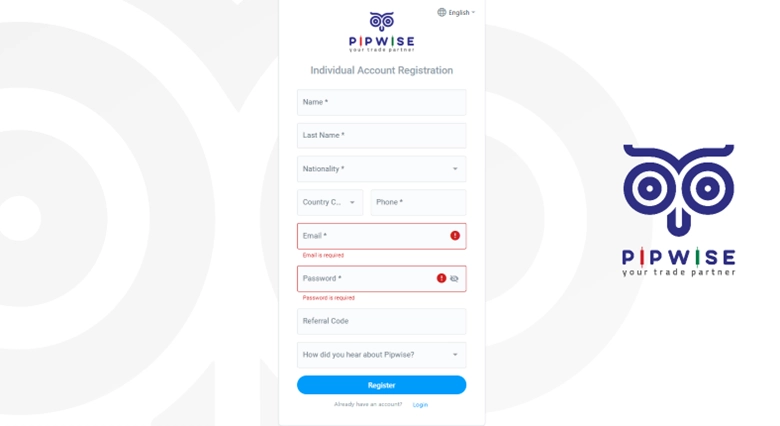
Confirm Registration in pipwise
Step 3: Start the Identity Verification Process (KYC)
Identity verification is required to begin trading.
- Access the KYC / Identity Verification section (as shown in the image).
- Upload clear and valid documents, including:
- A government-issued ID (Identity Card or Passport)
- A selfie holding the same ID.
Once the documents are verified, your account will be approved, and you can proceed to create a trading account.
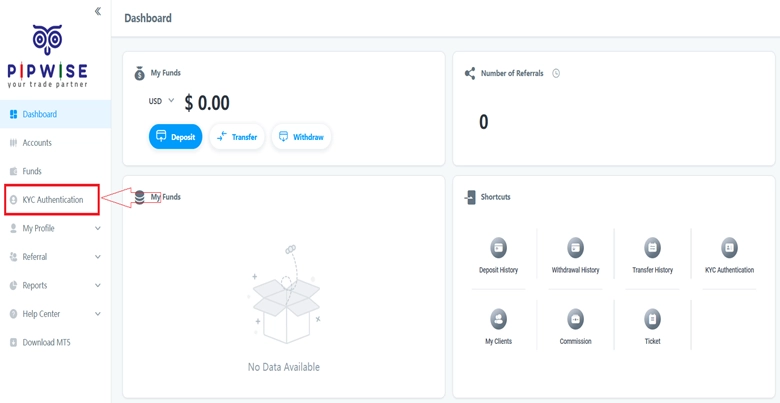
Start the Identity Verification Process
Step 4: Create a Live or Demo Trading Account
After verification is complete:
- Navigate to the Accounts section (as shown in the image).
- Click Create Live Account to open a real trading account.
- Optionally, click Create Demo Account to practice trading without KYC.
Note: Demo accounts do not require identity verification (KYC).
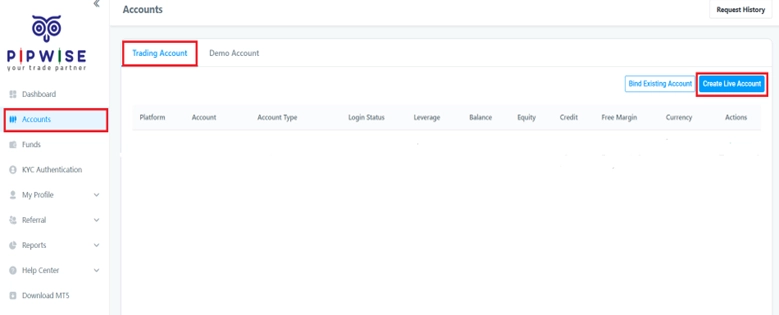
Create a Demo Trading Account
Step 5: Select Account Type and Trading Platform
Choose the account type based on your trading style:
- Standard Account – Minimum deposit $20
- ECN Account – Minimum deposit $500
- ECN PRO Account – Minimum deposit $1,000
Select MT5 (Meta Trader 5) as your trading platform.
After submission, your account credentials (username, password, server) will be sent via email. Use these credentials to log in to the MT5 platform.
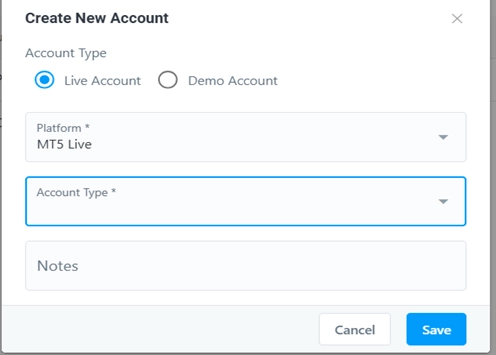
step five of registration: create new account
Step 6: Download and Install MT5 Platform
- Download Meta Trader 5 (MT5) from the official PIPWISE website
(click here to download). - Install MT5 and log in using the credentials emailed to you.
- You can now start trading and execute orders efficiently.
Summary
PIPWISE combines structured registration, diverse account types, and full compliance with international standards, providing traders with a secure, professional, and user-friendly trading environment.
Whether you are a beginner or an experienced trader, PIPWISE is designed to facilitate smooth account activation and trading operations.
post comments
Together We Rise: A Campaign for Everyone